Updated May 2026: I’ve refreshed this guide to make the Slow Stochastics formula clearer, separate range-position from buy/sell signals, and update the Python chart tutorial for traders who want to build the indicator step by step.
What Is the Slow Stochastics Indicator?
Slow Stochastics is a chart indicator that measures where the latest close sits inside a recent high-low range.
Imagine a stock traded between 90 and 100 over the last 14 bars. A close near 100 gives a high Stochastics reading. A close near 90 gives a low reading. The indicator is usually plotted under the price chart on a scale from 0 to 100.
Readings above 80 usually mean price has been closing near the upper part of its recent range. Readings below 20 usually mean price has been closing near the lower part of its recent range.
That sounds useful, but it is easy to misuse. A high reading does not automatically mean “sell,” and a low reading does not automatically mean “buy.” In a strong uptrend, price can keep closing near the top of its range for longer than feels comfortable. In a strong downtrend, it can keep closing near the bottom.
The “slow” part comes from smoothing. Instead of showing the jumpiest version of the Stochastics reading, Slow Stochastics smooths the line so the indicator moves more steadily. The chart can become easier to read, but some signals will arrive later.
You will usually see two lines on a Slow Stochastics chart. The main line is called %K. The smoother signal line is called %D. We will unpack both before we get to the Python code.
Fast vs Slow Stochastics and Why the Slow Version Exists
The Stochastics oscillator is usually associated with George C. Lane and the technical-analysis work of the late 1950s. It was built around the relationship between the latest close and the recent trading range.
The fastest version starts with a raw line called Fast %K. This line measures the close against the recent high and low, then converts the result into a 0 to 100 reading.
Fast %K can move around sharply because it reacts straight away to each new close. Traders often smooth that raw line with a moving average to make it easier to read.
That smoothed Fast %K line becomes the main line used in Slow Stochastics. Charting platforms usually call it Slow %K. A second moving average is then applied to Slow %K to create Slow %D.
So the slow version keeps the same range-position idea, but adds smoothing before the trader reads the signal. The benefit is a calmer oscillator. The cost is delay.
The line names can be confusing at first, so it helps to separate them before looking at the formulas.
| Term | Meaning |
|---|---|
| Fast %K | The raw Stochastics reading showing where the close sits in the recent range |
| Fast %D | A moving average of Fast %K |
| Slow %K | The main Slow Stochastics line, usually the smoothed Fast %K |
| Slow %D | A moving average of Slow %K and often used as the signal line |
How Slow Stochastics Is Calculated
Slow Stochastics measures the latest close against a recent high-low range, then smooths the result.
For a common 14, 3, 3 setting, the three numbers mean:
The first number is the lookback period. A 14-period setting checks the highest high and lowest low over the last 14 bars.
The second number smooths the raw Stochastics reading to create Slow %K.
The third number smooths Slow %K to create Slow %D.
A bar just means one chart interval. On a daily chart, 14 bars means 14 trading days. On a 15-minute chart, it means 14 candles of 15 minutes each.
Before the formulas, here are the symbols we need.
C means the current closing price.
H means the highest high in the lookback period.
L means the lowest low in the lookback period.
N is the lookback period.
SMA means simple moving average.
Step 1: Calculate the raw Stochastics reading
Fast\ \%K = 100 \times \frac{C - L_N}{H_N - L_N}Fast %K = 100 × (close – lookback low) / (lookback high – lookback low)
This produces a 0 to 100 reading. A value near 100 means the close is near the top of the recent range. A value near 0 means the close is near the bottom.
For example, if the recent low is 90, the recent high is 100, and the latest close is 98, the reading is 80. Price closed in the upper part of the recent range.
Step 2: Smooth Fast %K into Slow %K
Slow\ \%K = SMA_m(Fast\ \%K)
Slow %K = moving average of Fast %K
The m in the formula is the smoothing period. In the common 14, 3, 3 setting, m is 3.
This smoothing step is what makes Slow %K less jumpy than the raw Fast %K line.
Step 3: Smooth Slow %K into Slow %D
Slow\ \%D = SMA_p(Slow\ \%K)
Slow %D = moving average of Slow %K
The p in the formula is the signal-line smoothing period. In the common 14, 3, 3 setting, p is also 3.
Slow %D is the smoother signal line. Traders often compare Slow %K with Slow %D to see whether the main Stochastics line is turning up or down against its own recent average.
| Stage | What it does | Usual 14, 3, 3 setting |
|---|---|---|
| Fast %K | Measures where the close sits in the recent high-low range | 14-bar lookback |
| Slow %K | Smooths Fast %K | 3-period moving average |
| Slow %D | Smooths Slow %K | 3-period moving average |
Original vs simplified calculation
Some charting platforms offer original and simplified Slow Stochastics calculations. The difference is where the smoothing is applied before Slow %K is produced.
In the original-style calculation, the two pieces of the range calculation are smoothed separately. The closing range gets smoothed, the total high-low range gets smoothed, and then the ratio is calculated.
Slow\ \%K = 100 \times \frac{SMA_m(C - L_N)}{SMA_m(H_N - L_N)}Original-style Slow %K = 100 × smoothed closing range / smoothed total range
In the simplified calculation, the raw Stochastics reading is calculated first. That finished reading is then smoothed.
Slow\ \%K = SMA_m\left(100 \times \frac{C - L_N}{H_N - L_N}\right)Simplified Slow %K = moving average of the raw Fast %K reading
Slow %D is handled the same way after either version. It is a moving average of Slow %K. In the Python tutorial later in this guide, I use the simplified version because it is easier to follow and easier to code.
Original = smooth the pieces, then divide.
Simplified = divide first, then smooth the result.
What Slow Stochastics Is Good At
Slow Stochastics is useful when you want to know whether price is repeatedly closing near the top, middle, or bottom of its recent range.
That makes it different from a trend-following moving average. A moving average smooths price itself. Slow Stochastics looks at the close in relation to the recent high and low, then smooths that range-position reading.
The indicator is bounded between 0 and 100. A reading near 100 means the close is near the top of the lookback range. A reading near 0 means the close is near the bottom. A reading near 50 means the close is closer to the middle of that range.
This can be useful in markets that swing back and forth. If a spread, pair, index, or stock is behaving in a range, Slow Stochastics can help show when price has pushed toward one side of that range.
It is much easier to misuse in a strong trend. A reading above 80 can mean price is stretched, but it can also mean buyers keep closing the market near the top of the recent range. A reading below 20 can mean price is washed out, but it can also mean sellers are still in control.
I would use Slow Stochastics as context rather than a command. It can help answer whether the latest closes are pressing into the upper or lower part of the range, but it does not decide the trade by itself.
How Traders Read Slow Stochastics Signals
Slow Stochastics signals are best treated as context, not commands. The indicator can tell you whether closes are happening near the top or bottom of a recent range. It cannot tell you, by itself, that the next bar must reverse.
The three readings traders usually watch are the 80 and 20 zones, crossovers between Slow %K and Slow %D, and divergence between price and the indicator.
The 80 and 20 zones
The 80 and 20 levels are the usual reference lines.
When Slow Stochastics is above 80, price has been closing near the top of its recent range. When it is below 20, price has been closing near the bottom of its recent range.
Those levels are often called overbought and oversold, but the labels can be misleading. Above 80 does not automatically mean price is too high. Below 20 does not automatically mean price is too low.
In a range-bound market, a move into one of these zones can warn that price is stretched toward one side of the range. In a strong trend, the same reading can show persistence rather than exhaustion. That is why I would not use the 80 or 20 line as a standalone trigger.
Slow %K and Slow %D crossovers
A crossover happens when the faster Slow %K line crosses the smoother Slow %D line.
When Slow %K crosses above Slow %D, the main Stochastics line is turning up relative to its own recent average. That can support a bullish reading, especially if it happens after the indicator has been depressed.
When Slow %K crosses below Slow %D, the main line is turning down relative to its own recent average. That can support a bearish reading, especially if it happens after the indicator has been elevated.
The market matters. Crossovers are usually more useful when price is ranging or mean-reverting. In a strong trend, the indicator can keep giving early counter-trend crosses that look clever for a few candles and then get steamrolled.
Divergence
Divergence appears when price and Slow Stochastics stop confirming each other.
A bullish divergence forms when price makes a lower low, but Slow Stochastics makes a higher low. That can suggest downside pressure is weakening.
A bearish divergence forms when price makes a higher high, but Slow Stochastics makes a lower high. That can suggest upside pressure is weakening.
I would still wait for price confirmation. Divergence is easy to draw after the chart has turned. In real time, it is more useful as a warning sign than as a complete trade plan.
| Reading | What it shows | How I would read it |
|---|---|---|
| Slow Stochastics above 80 | Closes are near the top of the recent range | Stretched in a range, possible strength in a trend |
| Slow Stochastics below 20 | Closes are near the bottom of the recent range | Stretched in a range, possible weakness in a trend |
| Slow %K crosses above Slow %D | The main line turns up versus its signal line | Possible bullish confirmation |
| Slow %K crosses below Slow %D | The main line turns down versus its signal line | Possible bearish confirmation |
| Price makes a lower low, Stochastics makes a higher low | Downside pressure may be fading | Bullish divergence warning |
| Price makes a higher high, Stochastics makes a lower high | Upside pressure may be fading | Bearish divergence warning |
Choosing Slow Stochastics Settings
There is no single best Slow Stochastics setting. The common starting point is 14, 3, 3, but the right setting depends on the market, the time frame, and what you are trying to test.
The word period means bars, not days. On a daily chart, a 14-period lookback uses 14 daily bars. On a 15-minute chart, it uses 14 candles of 15 minutes each.
The lookback period
The lookback period controls the high-low range used in the first part of the calculation.
A shorter lookback makes the indicator more sensitive. It reacts faster, but it can also become noisy.
A longer lookback makes the indicator slower. It can look cleaner, but it may react late when the market turns.
For short-term trading, traders often test shorter lookbacks because they want a faster reading. For swing trading or longer-term charts, a longer lookback may be easier to read, but it should still be tested rather than assumed.
The smoothing periods
The second and third numbers in a 14, 3, 3 setting control smoothing.
The second number smooths the raw Stochastics reading to create Slow %K. The third number smooths Slow %K to create Slow %D.
Increasing the smoothing makes the lines calmer and slower. Reducing the smoothing makes them more responsive and more jumpy.
I would change one setting at a time when testing. If you change the lookback and both smoothing values together, it becomes harder to know which change actually improved or worsened the chart.
Testing settings without fooling yourself
A setting that looks perfect on one old chart may be overfitted to that chart.
A better test is to try nearby values, different markets, and different periods of history. If the idea only works on one exact setting, on one ticker, over one date range, I would be suspicious.
This is especially important with Stochastics because the indicator can behave very differently in trending and mean-reverting markets.
| Setting change | What usually happens | Main risk |
|---|---|---|
| Shorter lookback | Faster oscillator | More noise |
| Longer lookback | Smoother oscillator | Later signals |
| Less smoothing | More responsive %K and %D | More twitchy crosses |
| More smoothing | Cleaner-looking lines | More delay |
Pros and Cons of the Slow Stochastics Indicator
Slow Stochastics is useful because it gives traders a clean way to see where price is closing inside its recent range. It is easy to read, works on different time frames, and gives clear reference points through the 80 and 20 zones.
The weakness is that those same clean readings can be too tempting. A line above 80 can look like an obvious short. A line below 20 can look like an obvious long. In a strong trend, that kind of thinking can get punished quickly.
I would treat Slow Stochastics as a context tool first. It can help show whether price is pressing into the upper or lower part of its range, whether momentum is turning against its own recent average, and whether price and the oscillator are starting to diverge.
I would be more cautious using it as a standalone entry system. The indicator is usually at its best when combined with market structure, trend context, support and resistance, volume, or a clearly tested mean-reversion setup.
| Strength | Why it helps |
|---|---|
| Easy to read | The 0 to 100 scale makes the indicator visually clear |
| Shows range position | It tells you whether price is closing near the top or bottom of its recent range |
| Smoother than Fast Stochastics | The extra smoothing can reduce some of the smaller wiggles |
| Useful for divergence | It can show when price makes a new extreme but the oscillator does not confirm |
| Works across time frames | The same calculation can be applied to daily, intraday, weekly or other bars |
| Weakness | Why it matters |
|---|---|
| Can mislead in strong trends | Overbought can stay overbought, and oversold can stay oversold |
| Crossovers can be noisy | Slow %K and Slow %D may cross repeatedly in choppy markets |
| Smoothing adds delay | Cleaner lines often mean later signals |
| Settings are easy to overfit | A setting can look good on one chart and fail elsewhere |
| Needs market context | The same reading can mean exhaustion in a range or strength in a trend |
The practical takeaway is simple enough. Slow Stochastics can be helpful when the market is rotating inside a range or when you want a second view of momentum. It becomes more dangerous when a trader treats 80 and 20 as automatic trade buttons.
Quick Slow Stochastics Takeaways Before We Code
- Slow Stochastics measures where the latest close sits inside a recent high-low range.
- The indicator is plotted from 0 to 100, with higher readings showing closes near the top of the recent range and lower readings showing closes near the bottom.
- The slow version adds smoothing, which makes the oscillator calmer than Fast Stochastics but also adds delay.
- A common setting is 14, 3, 3. The first number is the lookback period, the second smooths the raw Stochastics reading into Slow %K, and the third smooths Slow %K into Slow %D.
- Readings above 80 and below 20 are context zones, not automatic sell and buy buttons.
- Slow %K and Slow %D crossovers can help show when the oscillator is turning, but they need market context.
- Slow Stochastics often behaves better in range-bound or mean-reverting conditions than in strong trending markets.
- Divergence can warn that price and momentum are no longer confirming each other, but it still needs price confirmation.
- The Python tutorial below uses the simplified calculation, where we calculate the raw Stochastics reading first and then smooth it.
Now we can build the indicator ourselves. The Python section follows the same steps used above: find the recent high and low, calculate the raw Stochastics reading, smooth it into Slow %K, smooth that into Slow %D, then plot the result under a price chart.
Coding and Charting Slow Stochastics with Python
Now we can build Slow Stochastics in Python.
I am going to keep this as a step-by-step tutorial rather than dropping in one large script. Each block goes into the same file, in order. By the end, we will have downloaded market data, calculated the simplified Slow Stochastics lines, added the 20 and 80 reference levels, and plotted everything under a candlestick chart.
For this example I use SPY rather than the VIX. The code will still work with other Yahoo Finance tickers, but a normal stock or ETF is easier to learn from than a volatility index.
Step 1: Install the Python libraries
This guide assumes you already have Python installed. I am using Visual Studio Code as the editor.
Open a terminal in VS Code by clicking Terminal > New Terminal, then run:
python -m pip install yfinance pandas mplfinance matplotlibOn some Windows machines, this version works instead:
py -m pip install yfinance pandas mplfinance matplotlibWe do not need numpy for this version of the script. pandas can handle the rolling-window calculations we need.
Step 2: Create the Python file and import the libraries
Create a new file in VS Code and save it as:
slow_stochastics.py
At the top of the file, add the libraries:
import pandas as pd
import yfinance as yf
import mplfinance as mpf
from matplotlib.lines import Line2Dpandas handles the data table and rolling-window calculations.
yfinance downloads the market data.
mplfinance draws the candlestick chart.
Line2D lets us build a clean legend for the Slow %K, Slow %D, 20 line and 80 line.
Step 3: Add the settings
Next, add the settings near the top of the file. Keeping them together makes the script easier to change later.
ticker = "SPY"
chart_title = "SPDR S&P 500 ETF"

start_date = "2025-05-01"
end_date = "2026-05-01"

lookback_period = 14
k_smooth = 3
d_smooth = 3

oversold_level = 20
overbought_level = 80
ticker is the Yahoo Finance symbol we want to download.
chart_title is the title printed on the chart.
start_date and end_date use YYYY-MM-DD format. yfinance treats the end date as a cut-off, so pushing it one trading day later can help if you want the most recent bar included.
lookback_period is the first number in a 14, 3, 3 Slow Stochastics setting.
k_smooth smooths the raw Stochastics reading into Slow %K.
d_smooth smooths Slow %K into Slow %D.
oversold_level and overbought_level draw the usual 20 and 80 reference lines.
Step 4: Define the Slow Stochastics function
Now we define the function that calculates the indicator. This version follows the simplified calculation from earlier in the guide.
def calculate_slow_stochastics(data, lookback=14, k_smooth=3, d_smooth=3):
    # Find the lowest low and highest high over the lookback window
    low_min = data["Low"].rolling(window=lookback).min()
    high_max = data["High"].rolling(window=lookback).max()

    # Raw Fast %K: where the close sits inside the recent high-low range
    raw_k = 100 * (data["Close"] - low_min) / (high_max - low_min)

    # Slow %K: smooth the raw Fast %K reading
    slow_k = raw_k.rolling(window=k_smooth).mean()

    # Slow %D: smooth Slow %K to create the signal line
    slow_d = slow_k.rolling(window=d_smooth).mean()

return slow_k, slow_dThe function takes the full market data table as its input.
low_min finds the lowest low over the lookback window.
high_max finds the highest high over the same window.
raw_k calculates the unsmoothed Stochastics reading.
slow_k smooths raw_k. This gives us the Slow %K line.
slow_d smooths slow_k. This gives us the Slow %D signal line.
The final line returns both Slow Stochastics lines so we can add them to the chart later.
Step 5: Download the market data
Now we download the price data from Yahoo Finance.
data = yf.download(
    ticker,
    start=start_date,
    end=end_date,
    auto_adjust=True,
    progress=False,
    multi_level_index=False
)

if data.empty:
    raise RuntimeError("No data was downloaded. Check the ticker symbol and date range.")

data.index = pd.DatetimeIndex(data.index)This downloads open, high, low, close and volume data for the ticker and dates we set earlier.
auto_adjust=True keeps the price series adjusted where applicable.
progress=False removes the download progress bar.
multi_level_index=False helps keep the table columns easier to work with.
The final line makes sure the chart index is treated as dates.
Step 6: Calculate Slow %K and Slow %D
Now we call the function and add the two indicator lines to the data table.
data["Slow %K"], data["Slow %D"] = calculate_slow_stochastics(
    data,
    lookback=lookback_period,
    k_smooth=k_smooth,
    d_smooth=d_smooth
)Think of data as a spreadsheet. We started with columns such as Open, High, Low, Close and Volume. This line adds two more columns: Slow %K and Slow %D.
Step 7: Add the 20 and 80 reference lines
The 20 and 80 lines are not trade buttons. They are reference levels that help show when the oscillator is near the lower or upper part of its scale.
data["20 Line"] = oversold_level
data["80 Line"] = overbought_levelWe also remove the early blank values before plotting. Those blanks appear because rolling-window calculations need enough bars before they can produce values.
plot_data = data.dropna(subset=["Slow %K", "Slow %D"])
]Step 8: Define the extra chart lines
Next we tell mplfinance which indicator lines to draw under the price chart.
stoch_plots = [
    mpf.make_addplot(
        plot_data["Slow %K"],
        panel=2,
        color="blue",
        width=1.2,
        ylabel="Slow Stochastics"
    ),
    mpf.make_addplot(
        plot_data["Slow %D"],
        panel=2,
        color="red",
        width=1.0
    ),
    mpf.make_addplot(
        plot_data["20 Line"],
        panel=2,
        color="black",
        linestyle="--",
        width=0.8
    ),
    mpf.make_addplot(
        plot_data["80 Line"],
        panel=2,
        color="grey",
        linestyle="--",
        width=0.8
    )
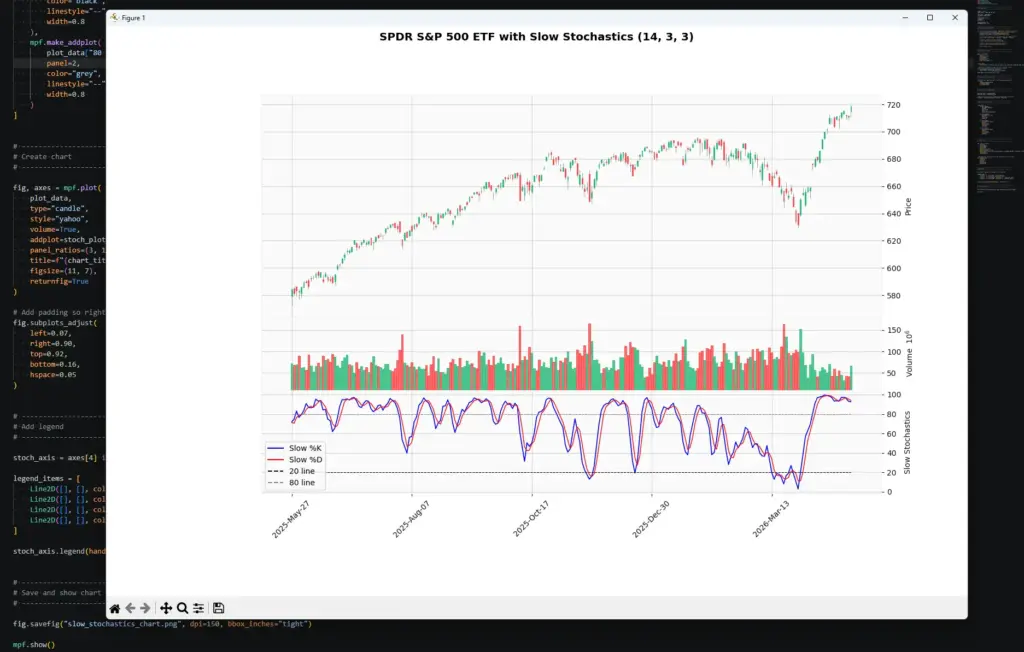
]The blue line is Slow %K.
The red line is Slow %D.
The dashed lines mark 20 and 80.
panel=2 places the Stochastics panel below the price and volume panels.
Step 9: Create the chart
Now create the candlestick chart and attach the Slow Stochastics panel.
fig, axes = mpf.plot(
    plot_data,
    type="candle",
    style="yahoo",
    volume=True,
    addplot=stoch_plots,
    panel_ratios=(3, 1, 1.4),
    title=f"{chart_title} with Slow Stochastics ({lookback_period}, {k_smooth}, {d_smooth})",
    figsize=(11, 7),
    returnfig=True
)

fig.subplots_adjust(
    left=0.07,
    right=0.90,
    top=0.92,
    bottom=0.16,
    hspace=0.05
)type="candle" gives us a candlestick chart.
volume=True adds the volume panel.
addplot=stoch_plots adds the Slow %K, Slow %D, 20 line and 80 line.
panel_ratios controls the relative size of the price, volume and Stochastics panels.
subplots_adjust gives the chart some breathing room so the right-hand labels and angled dates are not clipped.
Step 10: Add the legend and show the chart
Finally, add a legend to the Stochastics panel and show the chart.
stoch_axis = axes[4] if len(axes) > 4 else axes[-1]

legend_items = [
    Line2D([], [], color="blue", label="Slow %K"),
    Line2D([], [], color="red", label="Slow %D"),
    Line2D([], [], color="black", linestyle="--", label="20 line"),
    Line2D([], [], color="grey", linestyle="--", label="80 line")
]

stoch_axis.legend(handles=legend_items, loc="lower left")

mpf.show()mplfinance creates several axes behind the scenes. The stoch_axis line grabs the lower indicator panel so the legend appears in the right place.
mpf.show() opens the finished chart window.
Optional save line, placed just before mpf.show():
fig.savefig("slow_stochastics_chart.png", dpi=150, bbox_inches="tight")That saves a PNG image in the same folder as your Python script.
Step 11: Run the script
Save slow_stochastics.py by pressing Ctrl+S.
The easiest route is usually to click the play button in the top-right corner of VS Code. If that works, the chart window should open.
You can also run it from the terminal. Open Terminal > New Terminal, move into the folder where you saved the script, then run:
python slow_stochastics.pyOn some Windows setups, use:
py slow_stochastics.pyIf all has gone to plan you will end up with a chart looking like the one I made below:
Step 12: Customise the script
Once the script works, start changing the inputs.
To change the market, edit:
ticker = "SPY"
chart_title = "SPDR S&P 500 ETF"To change the date range, edit:
start_date = "2025-05-01"
end_date = "2026-05-01"To change the Slow Stochastics settings, edit:
lookback_period = 14
k_smooth = 3
d_smooth = 3Change one thing at a time. Try a shorter lookback, rerun the chart, then try a longer lookback. The point is to see how the indicator changes, not just to hunt for a setting that looked good on one old chart.